Wednesday, April 11, 2018

Multiple Organizaton

1) Create Role hierarchy for each organization.
2) Make all custom and standard objects Private to make inaccessible to users from another organization.
3) Created new Account Record Type - Organization. Create new Records with this record Type for all organizations.
4) For Reports create custom field "Organization" on Opportunity and "Company" on User. Here we write down the organization name to which the user belongs. The value entered in the field must match the account name for the corresponding organization.
5) Create trigger which will fill out "Organization" field on Opportunity regard of User's Company.

Wednesday, February 28, 2018

Lead perfomance and tracking of Status, Owners and Activities

Lead Status and Owner Tracking

Quite often requires tracking changes of Lead Status and Owners and Lead Activities.
To store Lead changes, time between changes, and Activities we used Lead Tracking custom object:

When Lead Status or Owner changed, will be inserted new Lead Tracking record. In related list show "New Status", "Previous Status"(if End Status is empty - current Status), "Start" Date, "End" Date and "Elapsed Time". If Lead Status again to change, record with empty "New Status" field will be updated: will write down a new Lead Status and date of the change.
If Lead Owner changed, Lead Tracking inserts similar like when changed Status, but "Field" will be "Onwer", "Previous" and "New" a new Owner and Previous Owner. Trigger handler:

   public Map getNewOwnerName(Set ownIds){
        Map ownerMap = new Map();  
        List groups =  [SELECT Id, Name FROM Group WHERE Id IN :ownIds];
        List users = [SELECT Id, Name FROM User WHERE Id IN :ownIds];
        for(Group g : groups){
            ownerMap.put(g.Id, g.Name);
        }
        for(User u: users){
            ownerMap.put(u.Id, u.Name);
        }
        return ownerMap;
    }
    public void afterInsert( List newleads){
        List toInsert = new List();       
        Set ownIds = new Set ();
        for(Lead l : newleads){
            ownIds.add(l.OwnerId);
        }
        Map ownerMap = getNewOwnerName(ownIds);   
        for(Lead l : newleads){
            Lead_Tracking__c tr = new Lead_Tracking__c();
            tr.Start__c = l.CreatedDate;
            tr.Start_Value__c = l.Status;
            tr.Lead__c = l.Id; 
            tr.Changed_by__c = UserInfo.getUserId();
            tr.Field__c = 'Status';           
            toInsert.Add(tr);
            Lead_Tracking__c tr1 = new Lead_Tracking__c();
            tr1.Start__c = l.CreatedDate;
            tr1.Start_Value__c = ownerMap.get(l.OwnerId);
            tr1.Lead__c = l.Id; 
            tr1.Changed_by__c = UserInfo.getUserId();
            tr1.Field__c = 'Owner';
            tr1.Owner_Type__c = (String.valueOf(l.OwnerId).StartsWith('005')? 'User' : 'Queue');

            toInsert.Add(tr1);    
        }
        insert toInsert;

    }
    public void afterUpdate(List newLeads, map oldMap){
        Map newValMap = new map();
        Set ownerIds = new Set();
        for(Lead l: newLeads){
            if(l.Status != oldMap.get(l.Id).Status || l.OwnerID != oldMap.get(l.Id).OwnerID){
                newValMap.put(l.Id, l);
                ownerIds.add(l.OwnerId);
            }           
        }
        Map  newOwnerMap = getNewOwnerName(ownerIds);
        List toUpdList = new List();
        toUpdList = [SELECT Id, End__c, End_Value__c, Lead__c,  Start__c, Start_Value__c, Changed_by__c, Lead__r.OwnerId, Field__c 
                      FROM Lead_Tracking__c
                       WHERE Lead__c IN: newValMap.keySet() AND End__c = null AND End_Value__c =null ];
        ListtoInsert = new List();
        set existLeads = new set();
        for(Lead_Tracking__c tr: toUpdList){
            existLeads.add(tr.Lead__c);
            if(tr.Field__c == 'Status' && tr.Start_Value__c == oldMap.get(tr.Lead__c).Status &&  oldMap.get(tr.Lead__c).Status != newValMap.get(tr.Lead__c).Status ){
                tr.End_Value__c = newValMap.get(tr.Lead__c).Status;
                tr.End__c = newValMap.get(tr.Lead__c).LastModifiedDate;
                tr.Changed_by__c = UserInfo.getUserId(); 
                Lead_Tracking__c new_tr = new Lead_Tracking__c();
                new_tr.Lead__c = tr.Lead__c;
                new_tr.Start__c = newValMap.get(tr.Lead__c).LastModifiedDate;
                new_tr.Start_Value__c = newValMap.get(tr.Lead__c).Status;
                new_tr.Changed_by__c = UserInfo.getUserId(); 
                new_tr.Field__c = 'Status';
                toInsert.add(new_tr);
            }
        
            if(tr.Field__c == 'Owner' && oldMap.get(tr.Lead__c).OwnerId != newValMap.get(tr.Lead__c).OwnerId ){
                tr.End_Value__c = newOwnerMap.get(tr.Lead__r.OwnerId);
                tr.End__c = newValMap.get(tr.Lead__c).LastModifiedDate;
                tr.Changed_by__c = UserInfo.getUserId();
                Lead_Tracking__c new_tr = new Lead_Tracking__c();
                new_tr.Lead__c = tr.Lead__c;
                new_tr.Start__c = newValMap.get(tr.Lead__c).LastModifiedDate;
                new_tr.Start_Value__c = newOwnerMap.get(tr.Lead__r.OwnerId);
                new_tr.Changed_by__c = UserInfo.getUserId();
                new_tr.Field__c = 'Owner';
                new_tr.Owner_Type__c = (String.valueOf(tr.Lead__r.OwnerId).StartsWith('005')? 'User' : 'Queue');
                toInsert.add(new_tr);
            }
        } 
        for(Lead l : newLeads){
            if(!existLeads.contains(l.id) && (l.Status != oldMap.get(l.Id).Status || l.OwnerID != oldMap.get(l.Id).OwnerID)){
                Lead_Tracking__c tr = new Lead_Tracking__c();
                tr.Start__c = system.now();
                tr.Start_Value__c = l.Status;
                tr.Lead__c = l.Id; 
                tr.Changed_by__c = UserInfo.getUserId();
                tr.Field__c = 'Status';           
                toInsert.Add(tr);
                Lead_Tracking__c tr1 = new Lead_Tracking__c();
                tr1.Start__c = system.now();
                tr1.Start_Value__c = newOwnerMap.get(l.OwnerId);
                tr1.Lead__c = l.Id; 
                tr1.Changed_by__c = UserInfo.getUserId();
                tr1.Field__c = 'Owner';
                tr1.Owner_Type__c = (String.valueOf(l.OwnerId).StartsWith('005')? 'User' : 'Queue');
    
                toInsert.Add(tr1);
            }    
        }
        insert toInsert;
        update toUpdList;
    }
    public void beforeDelete(map oldMap){
        List  toDelete = [SELECT Id FROM Lead_Tracking__c WHERE Lead__c IN: oldMap.keySet()];       
        delete toDelete;
    }

Elapsed time before first Activity

When the first Activity of certain Lead Owner created, the trigger on Activity writes downtime between lead assignment and creation of activity.

 public void afterInsert(List callList){
        Set leadIds = new Set();
        Map trackMapUpd = new Map();
        List toUpd = new List();
        for(Task t : callList){
            System.debug(t);
            if(t.Subject.contains('Call')){
                leadIds.add(t.WhoId);
            }
        }

        for(Lead_Tracking__c tr : [SELECT Id, Lead__c,  Elapsed_time_before_first_activity__c, Start__c, CreatedDate, End_Value__c FROM Lead_Tracking__c WHERE Lead__c IN: leadIds AND Field__c = 'Owner' AND End_Value__c = null  ORDER BY Start__c ASC]){
            if(tr.Elapsed_time_before_first_activity__c == null){
                trackMapUpd.put(tr.Lead__c, tr);
            }
        }

        if(trackMapUpd.size()>0){
            for(Task t : callList){           
               trackMapUpd.get(t.WhoId).Elapsed_time_before_first_activity__c = GetElapsedTime(trackMapUpd.get(t.WhoId).CreatedDate, System.now());
               toUpd.add(trackMapUpd.get(t.WhoId));            
            }
            update toUpd;
        }
    }

    public static Decimal GetElapsedTime(DateTime startTime, DateTime endTime){
        if(startTime == null || endTime == null){
            return null;
        }
        return ((endTime.getTime())/1000/60) - ((startTime.getTime())/1000/60);
    }
Lead Tracking:

Thursday, July 27, 2017

"Who knows who" relations in Salesforce Contact and Accounts - part 2: Solution description

"Who Knows Who" - insert, update and delete reverse records

"Who Knows Who" custom object has Master-Detail relation with "reverse" record which inserts after insertion first record. When "Who Knows Who" record inserted, fires trigger which inserts "reverse" record:
 if(trigger.IsInsert){        
      for(Linked_Relationship__c l: trigger.new){
          if(l.Master_Relationship__c == null && l.Firm__c != l.Related_To_Firm__c){
               Linked_Relationship__c lc = new Linked_Relationship__c();
               lc.Firm__c =  l.Related_To_Firm__c;
               lc.Contact__c =    l.Related_To_Contact__c;
               lc.Related_To_Contact__c = l.Contact__c;
               lc.Related_To_Firm__c = l.Firm__c;
               lc.Reverse_Type__c =   l.Type__c;
               lc.Type__c = l.Reverse_Type__c;
               lc.Comments__c = l.Comments__c;
               lc.Master_Relationship__c = l.id;
               lc.Reverse_Contact_Relationship__c = l.Contact_Relationship__c; 
               lc.Contact_Relationship__c = l.Reverse_Contact_Relationship__c;
               toInsert.Add(lc); 
           }            
       }                                                    
   }
After "Who Knows Who" record update "reverse" record also will be updated (no difference - master or detail):
if(trigger.IsUpdate){        
     for(Linked_Relationship__c lr : trigger.new){
         if(lr.Master_Relationship__c == null){
              lrIds.Add(lr.Id);
         }
         else{
              masterIds.Add(lr.Master_Relationship__c);
         }
     }
     List updateList = [SELECT Id, Firm__c, Contact__c, Related_To_Contact__c, Related_To_Firm__c,
                                                  Reverse_Type__c, Type__c, Comments__c, Master_Relationship__c, 
                                                  Reverse_Contact_Relationship__c, Contact_Relationship__c
                                                  FROM Linked_Relationship__c WHERE
                                                  Master_Relationship__c IN: lrIds OR Id IN: masterIds];
    for(Linked_Relationship__c l : updateList ){
       if(l.Master_Relationship__c != null){
            lrMap.put(l.Master_Relationship__c, l);
       }
       else{
            lrMap.put(l.Id, l);  
       }
   }

   for(Linked_Relationship__c lr : trigger.new){
        if(lrMap.containskey(lr.Id)) {
            if (!(lrMap.get(lr.Id).Firm__c==lr.Related_To_Firm__c&&lrMap.get(lr.Id).Related_To_Firm__c==lr.Firm__c&&lrMap.get(lr.Id).Related_To_Contact__c==lr.Contact__c&&lrMap.get(lr.Id).Contact__c==lr.Related_To_Contact__c&&lrMap.get(lr.Id).Type__c==lr.Reverse_Type__c&&lrMap.get(lr.Id).Reverse_Type__c==lr.Type__c&&lrMap.get(lr.Id).Comments__c==lr.Comments__c&&lrMap.get(lr.Id).Reverse_Contact_Relationship__c == lr.Contact_Relationship__c&&lrMap.get(lr.Id).Contact_Relationship__c == lr.Reverse_Contact_Relationship__c )){
                lrMap.get(lr.Id).Firm__c =  lr.Related_To_Firm__c;
                lrMap.get(lr.Id).Contact__c = lr.Related_To_Contact__c;
                lrMap.get(lr.Id).Related_To_Contact__c = lr.Contact__c;
                lrMap.get(lr.Id).Related_To_Firm__c = lr.Firm__c;
                lrMap.get(lr.Id).Reverse_Type__c =   lr.Type__c;
                lrMap.get(lr.Id).Type__c = lr.Reverse_Type__c;
                lrMap.get(lr.Id).Comments__c = lr.Comments__c;
                lrMap.get(lr.Id).Reverse_Contact_Relationship__c = lr.Contact_Relationship__c; 
                lrMap.get(lr.Id).Contact_Relationship__c = lr.Reverse_Contact_Relationship__c;
                toInsert.Add(lrMap.get(lr.Id));
            }   
        }
       if(lrMap.containskey(lr.Master_Relationship__c)){ 
           if(!(lrMap.get(lr.Master_Relationship__c).Firm__c==lr.Related_To_Firm__c&&lrMap.get(lr.Master_Relationship__c).Related_To_Firm__c==lr.Firm__c&&lrMap.get(lr.Master_Relationship__c).Related_To_Contact__c==lr.Contact__c&&lrMap.get(lr.Master_Relationship__c).Contact__c==lr.Related_To_Contact__c&&lrMap.get(lr.Master_Relationship__c).Type__c==lr.Reverse_Type__c&&lrMap.get(lr.Master_Relationship__c).Reverse_Type__c==lr.Type__c&&lrMap.get(lr.Master_Relationship__c).Comments__c==lr.Comments__c&&lrMap.get(lr.Master_Relationship__c).Reverse_Contact_Relationship__c == lr.Contact_Relationship__c&&lrMap.get(lr.Master_Relationship__c).Contact_Relationship__c == lr.Reverse_Contact_Relationship__c )){
                lrMap.get(lr.Master_Relationship__c).Firm__c =  lr.Related_To_Firm__c;
                lrMap.get(lr.Master_Relationship__c).Contact__c = lr.Related_To_Contact__c;
                lrMap.get(lr.Master_Relationship__c).Related_To_Contact__c = lr.Contact__c;
                lrMap.get(lr.Master_Relationship__c).Related_To_Firm__c = lr.Firm__c;
                lrMap.get(lr.Master_Relationship__c).Reverse_Type__c =   lr.Type__c;
                lrMap.get(lr.Master_Relationship__c).Type__c = lr.Reverse_Type__c;
                lrMap.get(lr.Master_Relationship__c).Comments__c = lr.Comments__c;
                lrMap.get(lr.Master_Relationship__c).Reverse_Contact_Relationship__c = lr.Contact_Relationship__c; 
                lrMap.get(lr.Master_Relationship__c).Contact_Relationship__c = lr.Reverse_Contact_Relationship__c;
                toInsert.Add(lrMap.get(lr.Master_Relationship__c));
           }       
       }                             
   }
}
If "Who Knows Who" record deleted, "reverse" record also will be deleted:
for(Linked_Relationship__c lr: trigger.old){                          
              lrMap.put(lr.Firm__c, lr);
        }
List lrList = [SELECT Id, Firm__c, Contact__c, Related_To_Contact__c, Related_To_Firm__c,
                                               Reverse_Type__c, Type__c, Comments__c,  Master_Relationship__c,
                                               Reverse_Contact_Relationship__c, Contact_Relationship__c
                                               FROM Linked_Relationship__c WHERE
                                               Related_To_Firm__c IN: lrMap.keySet() ];
for(Linked_Relationship__c l : lrList )  {
    if(lrMap.get(l.Related_To_Firm__c).Firm__c==l.Related_To_Firm__c&&lrMap.get(l.Related_To_Firm__c).Related_To_Firm__c==l.Firm__c&&lrMap.get(l.Related_To_Firm__c).Related_To_Contact__c==l.Contact__c && lrMap.get(l.Related_To_Firm__c).Contact__c==l.Related_To_Contact__c&&lrMap.get(l.Related_To_Firm__c).Reverse_Type__c==l.Type__c&&lrMap.get(l.Related_To_Firm__c).Type__c==l.Reverse_Type__c&&lrMap.get(l.Related_To_Firm__c).Contact_Relationship__c==l.Reverse_Contact_Relationship__c&&lrMap.get(l.Related_To_Firm__c).Reverse_Contact_Relationship__c==l.Contact_Relationship__c){
          toDelete.Add(l);
    }
}                                                                                                              
delete toDelete;

Trigger on Contact

When Contact record inserted, trigger insert "Who Knows Who" records("User knows Contact" scenario).
for(Contact c: trigger.new){                
     Linked_Relationship__c l = new Linked_Relationship__c();
     l.Firm__c = knowContList[0].AccountId;
     l.Contact__c = knowContList[0].Id;
     l.Related_To_Firm__c = c.AccountId;
     l.Related_To_Contact__c = c.Id;
     toInsert.Add(l);                       
   }                       
}
After insertion of the first record, trigger on "Who Knows Who" inserts second - reverse record.
After update of Contact - change Contact's Account, triggers updates related "Who Knows Who" records.
for(Contact c: trigger.new){
     if(c.AccountId != trigger.oldMap.get(c.Id).AccountId ){
        contIds.Add(c.id);
        Linked_Relationship__c l = new Linked_Relationship__c();
        l.Firm__c = c.AccountId;
        l.Related_To_Firm__c = c.AccountId;
        l.Related_To_Contact__c = c.Id;
        l.Reverse_Contact_Relationship__c = 'Employee';
        l.Type__c = 'Employer';
        toInsert.Add(l); 
    }
}
List l_oldList = [SELECT Id, Firm__c, Type__c, Comments__c, Contact_Relationship__c,
                                                      Related_To_Firm__c, Related_To_Contact__c, Reverse_Type__c, 
                                                      Reverse_Contact_Relationship__c, Contact__c FROM Linked_Relationship__c 
                                                      WHERE Related_To_Contact__c IN: contIds ];                                                                                                 

Map> lrMap = new Map>();
List otherList = new List();

for(Linked_Relationship__c lr : l_oldList ){
    if(lr.Reverse_Contact_Relationship__c != null && lr.Reverse_Contact_Relationship__c.contains('Employee')){
        if(lrMap.containskey(lr.Related_To_Contact__c)){
            lrMap.get(lr.Related_To_Contact__c).Add(lr);
        }
        else{
            lrMap.put(lr.Related_To_Contact__c, new List{lr});
        } 
     }
     else{
        otherList.Add(lr);
     }                       
}
for(Contact c: [SELECT Id, AccountId, Account.Name FROM Contact WHERE Id IN:  trigger.new]){
                 Linked_Relationship__c l_new = new Linked_Relationship__c();
                 if(!lrMap.containskey(c.Id)){
                     l_new.Firm__c = c.AccountId;
                     l_new.Reverse_Type__c = 'Former Employer';
                     l_new.Contact__c = c.Id;
                     l_new.Contact_Relationship__c = 'Former Employee';
                     l_new.Related_To_Firm__c = trigger.oldMap.get(c.Id).AccountId;
                     l_new.Comments__c = string.valueof(date.today()) + ' - ' + c.Account.Name ;
                     toInsert.Add(l_new);
                 }
                 else{
                     for(Linked_Relationship__c l_old : lrMap.get(c.Id)){
                         l_old.Type__c = 'Former Employer';                        
                         l_old.Reverse_Contact_Relationship__c = 'Former Employee';                     
                         l_old.Comments__c = string.valueof(date.today())+ ' - ' + c.Account.Name;                          
                         l_old.Related_To_Firm__c = c.AccountId;
                         l_old.Related_To_Contact__c = c.Id;                                                                                                                                                          
                         toInsert.Add(l_old);                         
                     }
                }
               for(Linked_Relationship__c l_other : otherList ){
                    if(l_other.Contact__c == c.Id){
                        l_other.Firm__c = c.AccountId;
                        l_other.Contact__c = c.Id;
                        toInsert.Add(l_other);
                    }
               }

If Contact deleted, all related "Who Knows Who" records also will be deleted.
for(Contact c: trigger.old){
     contIds.Add(c.Id);
}
List lrList = [SELECT Id, Related_To_Contact__c, Contact__c 
        FROM Linked_Relationship__c
        WHERE Contact__c IN: contIds OR Related_To_Contact__c IN: contIds];

if(lrList.size()>0){        
     delete lrList;
}

"Who knows who" relations for Salesforce Contact and Accounts - part 1: How this works

Sometimes we need to store information about Contact-Contact, Account-Contact, Account-Account relations:
  • User knows Contact and Account
  • Contact is employee of a Company;
  • Account is Employer of a Contact;
  • Contact is former employee of a Company;
  • Account is former Employer of a Contact, etc.
For this purpose we used Custom object "Who Knows Who":

The records can be created manually and automatic. After insert "Who Knows Who" record fires trigger which inserts "reverse" record.
Automatic scenarios
User "knows" Account and created Contact
When new Contact created, new "Who Knows Who" record is inserted:
Contact related lists:
This Contact and Company related to User:
The user who creates this Contact "knows" it and Contact's Company (reverse record).
"Known" Contact("User" field - lookup to User):

Employer - Former Employer
When Contact reassigned to other Account, insert 2 "Who Know Who" records - "Employer" and "Former Employer": Account is Former Employer of Contact:
In left column information about Contact: current Contact's Company(Account field), and date of termination in previous company. Reverse record: In this way, information about Account's former employees stores in "Who Knows Who" related list. The account is the employer of Contact: Current Account stores info about former employer of Contact in "Who Knows Who" related list:
Manually scenarios
If you want to create a relation between some Contacts or Account, you can manually to insert "Who Knows Who" record and select kind of relationship in "Account relationship" and "Contact relationship" picklists.

Monday, January 16, 2017

Pre-poulate the "Name" field when creating a new record and update after saving

Sometimes there is a need to not use Auto-number as a record name. Instead, you want to pre-populate a Name field when creating a new record with a default value and update the Name based on some rules.
Unfortunately, it's impossible to create your own New custom button. The only option to achieve the requirement is to override the New button with custom VF page. Further please find solution description.

#Edit a new button - override with Visualforce page


Visualforce page was created which redirects to a hack URL with parameter "Name=Partner+Plan".

<apex:page standardController="Partner_Plan__c">
  <script>
      window.top.location.href = '/a0w/e?nooverride=1&retURL=%2Fa0w%2Fo&Name=Partner+Plan';  
 </script>
</apex:page>


#To prevent multiple redirect it's necessary to add parameter "nooverride=1".

After clicking on the button "New" you will be redirected to the page with these paramerers and field "Name" will be filled.
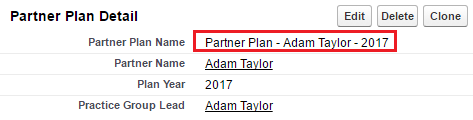
Partner Plan Name required update after saving. It should be consists "Partner Plan" + "Partner Name" + "Year".

#This was done using Workflow Rule.
  • Rule Criteria: true;
  • Evaluation Criteria: Evaluate the rule when a record is created, and every time it's edited
  • Immediate Workflow Action: field update;
  • Formula value: "Partner Plan - " + Practice_Group_Lead__r.FirstName + " " + Practice_Group_Lead__r.LastName + " " - " + TEXT(Plan_Year__c)
After saving:

Monday, August 22, 2016

Storage Usage issue - remove legacy and redundant Task records

Salesforce Orgs with long usage history (more than 3 years) and small Data Storage limits (~1GB) could suffer storage limit issues (> 100%).

In most cases Task object brings the issues with Data Storage overuse.

Unfortunately as per SFDC limitation there is no quick way to delete/remove Tasks created 2 years ago and backwards.

However there is a workaround using custom reports/data export and data loader. Please do not hesitate to contact us if you will need help to leverage this approach.

STEP 1: Export Data
Go to the Setup -> Data Management -> Data Export and click Export Now or Schedule Export button.


Tick Task then click Start Export.


As a result you will be able to download .zip file which contains .csv with tasks data.


STEP 2: Do clean up using Data Loader
Open as excel file and sort data by created date, leave id of tasks which needed to delete. Then use Data Loader to delete these tasks

Approach is a little bit time consuming but works.

Wednesday, July 13, 2016

Native fields in Lead mapping for conversion

For Leads conversion process Salesforce provides out-of-box functionality for mapping Lead fields to Account/Contact/Opportunity.

Unfortunately there is a limitations - you can't map native Leads fields to target object's native field. For instance you can't map value from LeadSource ("native" Lead field) to AccountSource ("native" Account field).

Here is one of the possible ways to workaround the limitation. Solution could be modified based on particular business requirements. Please do not hesitate to contact us if you want to leverage this solutions in your Saleforce instance.

STEP 1: Create custom Formula(Text) field for Lead object
Name: LeadSourceCustom
Formula:  TEXT(LeadSource)

STEP 2: Create custom Text(100) field for Account object
Name: AccountSourceCustom

STEP 3: Amend Lead fields mapping to write value from LeadSourceCustom to AccountSourceCustom.

STEP 4: Create simple Trigger on Account object
/*
    Version        : 1.0
    Company        : Websolo inc. 
    Date           : 07/2016
    Description    : 
    Update History : 
*/
trigger AccountSourceTrigger on Account (before update,before insert) {
    for(Account a: Trigger.new){
        if(a.AccountSourceCustom__c != null && a.AccountSourceCustom__c != '' && (a.AccountSource == null || a.AccountSource == '')){
            a.AccountSource = a.AccountSourceCustom__c;
        } 
    }
}

As a result this trigger will update native AccountSource field with value from "native" LeadSource field.

EXTRA NOTE:
We can't use WorkFlow as a workaround because AccountSource field is picklist and when we create workflow action to update this field we can write only specific value from the picklist.